FabTune: Online Music Player10.9.72
Publisher Description



Online music player app play music, podcasts, radio - discover music you like
FabTune Music Player is the music player for Android devices. With gorgeous equalizer, all formats supported and stylish UI, FabTune Music Player provides the best musical experience for you. Browse all songs on android device and built in playlist, listen to music without wifi, you deserve to get this perfect offline and online music player now!
Equalizer with great sound This MP3 player with bass boost, reverb effects, etc, built-in equalizer will enhance your music listening experience.
Audio Player for All Type of Audio Formats Not only an MP3 player, Music Player supports all music and audio formats including MP3, MIDI, WAV, FLAC, AAC, APE, etc. And play them in high quality.
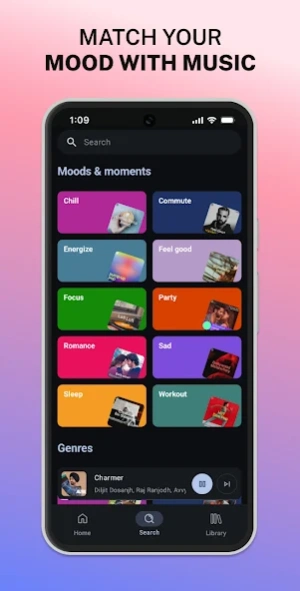
Nice User Interface Enjoy your music with stylish and simple user interface, FabTune Music Player is a perfect choice. Stream music and podcasts, listen to audiobooks, discover albums, playlists or even single songs for free on your mobile or tablet.
FabTune let you download and listen offline music anytime wherever you are. FabTune music player gives you access to a world of music, curated playlists, artists, and podcasts you love. Discover podcasts, new music, top songs or listen to your favorite artists and albums.
WHY FABTUNE FOR MUSIC AND PODCASTS?
• Listen to over 100 million songs and 5 million podcasts (and counting)
• Enjoy over 300,000 newly added audiobook titles
• Discover new music, albums, playlists and original podcasts.
• Search for your favorite song or artist by typing a lyric
• Enjoy amazing sound quality on music and podcasts across all devices.
• Create and share your own music playlists to suit your mood or discover other playlists you might like.
• Listen to daily music mixes made just for you.
• Explore top songs from different genres, countries or decades.
• Sing along to each song with our lyrics feature.
• Subscribe to your favourite podcasts so that you never miss an episode, then curate your very own podcast library.
• Bookmark individual podcasts into Playlists.
• Listen and discover the latest music from artists.
Listen to your favorite music artists all day every day via the Popular Radio playlist feature.
Listen to over 40 category genres -
New Releases, Charts, Live Events, Made for You, At Home, Only You, Summer, Pop, Workout, Hip-Hop, Mood, Party, Pride, Dance/Electronic, Alternative, Indie, Equal, Wellness, Rock, Frequency, R&B, Disney, Throwback, Radar, Chill, Sleep, In the car, Kids & Family, Caribbean, Classical, Romance, Jazz, Instrumental, Afro, Christian and Gospel and Country.
Listen to popular and exclusive podcasts
Introducing audiobooks on FabTune Everything you listen to, all in one place. Music, podcasts, and now audiobooks.
Now you can:
• Get lost in great stories.
• Discover exciting audiobook titles across all devices
• Easily switch between your favorite songs, shows, and stories.
Search, discover and play music, podcasts and audiobooks from all over the world for free, anywhere, anytime or create your own music playlists with the latest songs to suit your mood.
About FabTune: Online Music Player
The company that develops FabTune: Online Music Player is FabTune Music Apps. The latest version released by its developer is 10.9.72. This app was rated by 3 users of our site and has an average rating of 3.7.
To install FabTune: Online Music Player on your Android device, just click the green Continue To App button above to start the installation process. The app is listed on our website since 2026-06-18 and was downloaded 1,873 times. We have already checked if the download link is safe, however for your own protection we recommend that you scan the downloaded app with your antivirus. Your antivirus may detect the FabTune: Online Music Player as malware as malware if the download link to com.fabtune.music.player is broken.
How to install FabTune: Online Music Player on your Android device:
- Click on the Continue To App button on our website. This will redirect you to Google Play.
- Once the FabTune: Online Music Player is shown in the Google Play listing of your Android device, you can start its download and installation. Tap on the Install button located below the search bar and to the right of the app icon.
- A pop-up window with the permissions required by FabTune: Online Music Player will be shown. Click on Accept to continue the process.
- FabTune: Online Music Player will be downloaded onto your device, displaying a progress. Once the download completes, the installation will start and you'll get a notification after the installation is finished.
Program Details
System requirements
Download information
Pricing
Version History
version 10.9.72
posted on 2026-06-18
Bug fixes and improvements
version 10.9.63
posted on 2026-06-06
• Added Crossfade for smoother music playback.
• Improved video playback experience.
• Fixed search issues, crashes, and other bugs.
• General performance improvements.
version 10.9.27
posted on 2026-04-27
- Fixed crashes and ANR issues
- Improved song loading reliability
- Fixed video reload issues
- General bug fixes and performance improvements
version 10.7.92
posted on 2026-02-27
• Improved overall performance and app stability
• Fixed playback errors and streaming issues
version 10.7.74
posted on 2026-02-12
• Improved overall performance and app stability
• Fixed playback errors and streaming issues
• Resolved major crashes and unexpected app closures
• General bug fixes and backend improvements
version 10.7.56
posted on 2026-01-09
Fixed thumbnail fading issue.
Minor bug fixes and performance improvements.
version 10.7.39
posted on 2025-12-21
Fixed minor issues
